Telegram Bot
What Is the Telegram Bot?
The Receiptix Telegram bot lets you track expenses without opening the app. Send a photo of a receipt or a text description to @receiptix_bot on Telegram, and the bot processes it into an expense that syncs with your account.
You can use the Telegram bot as your primary way to add expenses — it works independently from the mobile app. As long as your account is linked, everything you send gets recorded.
Linking Your Account
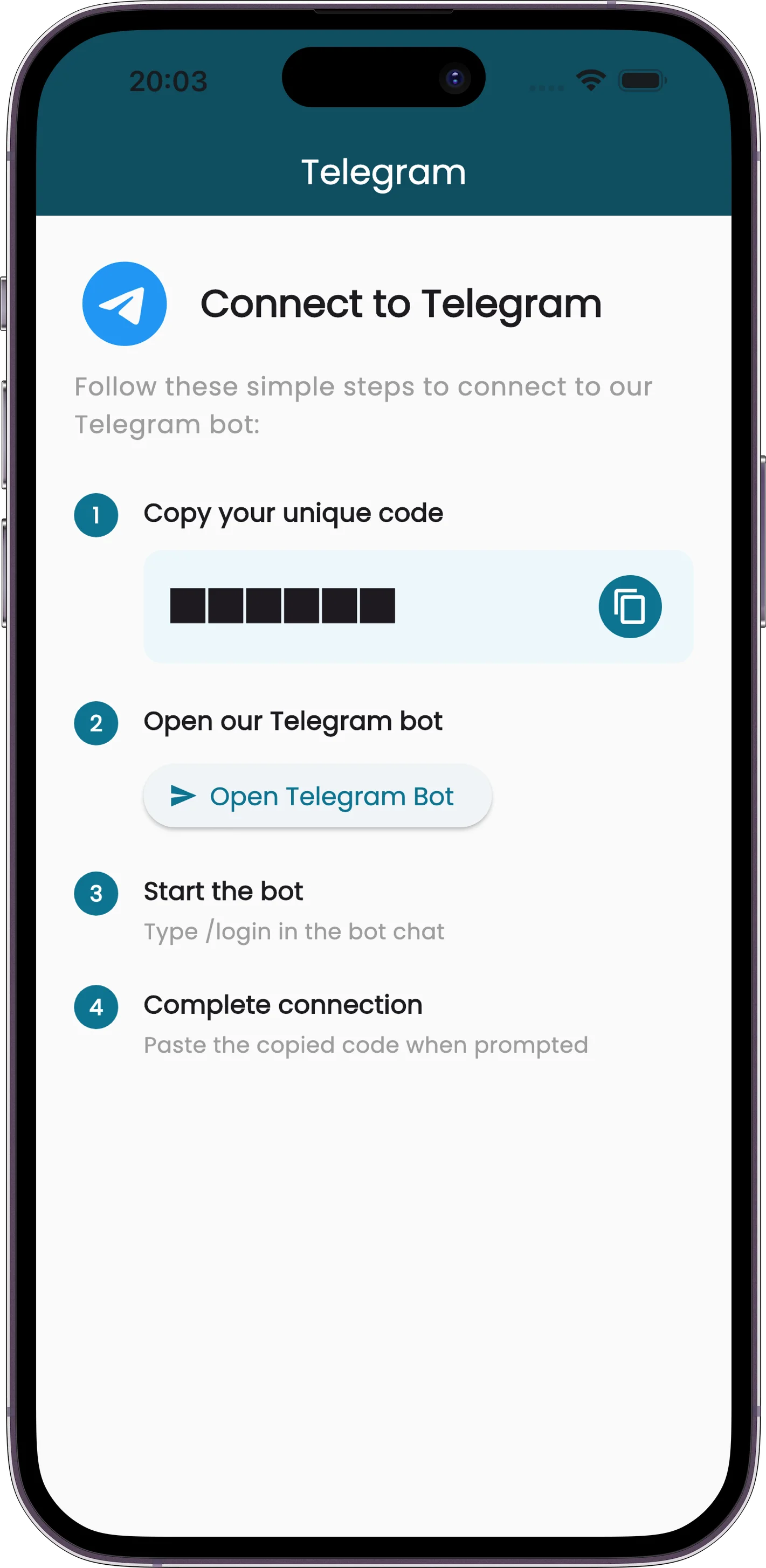
Connect your Receiptix account to Telegram in six steps:
Open Settings
In the Receiptix app, go to Settings > Telegram.
Get Your Code
Copy the unique 12-character code shown on screen — uppercase letters and digits.
Send /login
Type /login and send it to the bot.
Paste Your Code
When the bot asks, paste the 12-character code from the app.
Done
Your account is linked. Start sending receipts and expenses.
What You Can Send
The bot accepts five types of input:
Receipt Photos
Send a photo of a receipt. The bot extracts the merchant, items, and amounts automatically. PNG and JPEG.
Text Descriptions
Type a description of your expense, or prefix it with /add. The bot parses the details and creates the entry for you.
PDF Receipts
Forward the PDF invoices that hotels, airlines, and online shops email you straight into the chat.
Receipt Links
Paste a link to an online receipt or invoice and the bot fetches it — handy for order confirmations that only exist as a web page.
Voice Messages
Hold the mic and say it out loud. The bot transcribes it and logs the expense.
Everything the bot processes syncs automatically with your Receiptix account across all your devices.
Group Chats
Link a group chat to a project and everyone in it can log expenses — no Receiptix account required for members. Only the project owner sets this up.
Send /link
The project owner sends /link and picks which project the group feeds.
Everyone Logs
Any member can now add expenses with /add.
- Log with a command —
/add 50 USD dinner, or send a photo or PDF with/addin the caption - Reply to the bot — replying to any of its messages with a receipt logs that receipt
- Mention it — make the bot a group admin and you can skip the command:
@receiptix_bot dinner $50 - Change or remove the link — send
/linkagain to pick a different project or unlink the group - Subscription — group expense tracking needs an active subscription on the project owner's account. Members need nothing
Account management stays in a direct message — /login, /unlink and friends won't run in a group. If the linked project is archived, send /link to pick a new one.
Tags and Projects
Expenses go to your default project unless you say otherwise — in a linked group they go to the group's project:
- Set a default — send
/projectto pick which project new expenses land in - Override per expense — add
#project:Nameto send just that one elsewhere, like15 USD lunch #project:WorkTrip - Tag as you go — any other hashtag becomes a tag:
5 USD coffee #work. Tags require a subscription
Commands
- /help — the full list, any time
- /add or /log — log an expense
- /stats — your spending breakdown for the current month
- /project — choose your default project
- /link — connect a group chat to a project (group chats only)
- /signup and /login — create an account, or connect one you already have
- /install — a link to download the app
- /unlink — disconnect Telegram from your account
- /stop and /resume — opt out of marketing messages, or back in
Managing the Connection
Once linked, the Telegram settings screen in the Receiptix app shows your connection status along with convenient options:
- Connected status — confirms your Telegram account is linked
- Open bot — a button to jump directly to your conversation with @receiptix_bot
- Unlink — one-click disconnect if you want to stop using the bot or switch accounts
Tips and Details
- You can use the Telegram bot without the mobile app installed. As long as your account is linked, the bot works independently.
- The linking code is 12 characters, uppercase letters and digits. It's single-use and expires an hour after you generate it.
- Unlinking is instant. Tap the disconnect button in app settings and the bot stops processing your messages immediately.
- Works on any platform where Telegram runs — iOS, Android, desktop, and web.