Track Expenses on WhatsApp With Receiptix

Receiptix now lives inside WhatsApp. Send the bot a message — “4.50 oat latte” — and the expense lands in your account. Snap a photo of a receipt and it gets read, itemized, and filed. No opening a separate app, no switching context. You’re already in the chat you use forty times a day, so logging a purchase costs you one more message.
The reason this matters comes down to where the friction usually hides. Most expense tracking fails at the same spot: the gap between spending money and recording it. You buy the coffee, you mean to log it, and by the time you’ve unlocked your phone, found the app, waited for it to load, and tapped through to “add expense,” the moment’s gone. Three of those a day and you’ve quietly abandoned the whole habit by Thursday.
WhatsApp closes that gap, because it’s already open.
How it works
You message the bot the way you’d message a friend, and it understands a few different kinds of input.
Plain text. Type the amount and what it was — “12 lunch,” “85 groceries,” “30 gas” — and Receiptix creates the expense. It pulls the number out, keeps the description, and timestamps it. It’s the fastest way to capture a cash purchase or anything without a paper trail — the typed-message equivalent of the app’s quick voice logging.
Photos. Take a picture of a receipt and send it. Receiptix reads the whole thing — merchant, date, total, and each line item — and builds a structured expense out of it. The same receipt-scanning engine that runs in the app runs here, so a grocery receipt comes back as fifteen separate items, not one lump sum.
PDFs. Forward a PDF — the kind you get emailed after an online order or a utility bill — and it processes the same way. No printing, no screenshotting, just forward the attachment straight into the chat.
After each one finishes, the bot replies with what it logged: merchant, total, date, the items it found. You get a confirmation in the same thread, so you can glance at it and know the thing actually went through. If something looks off, you’ll see it right away instead of discovering a mangled entry three weeks later.
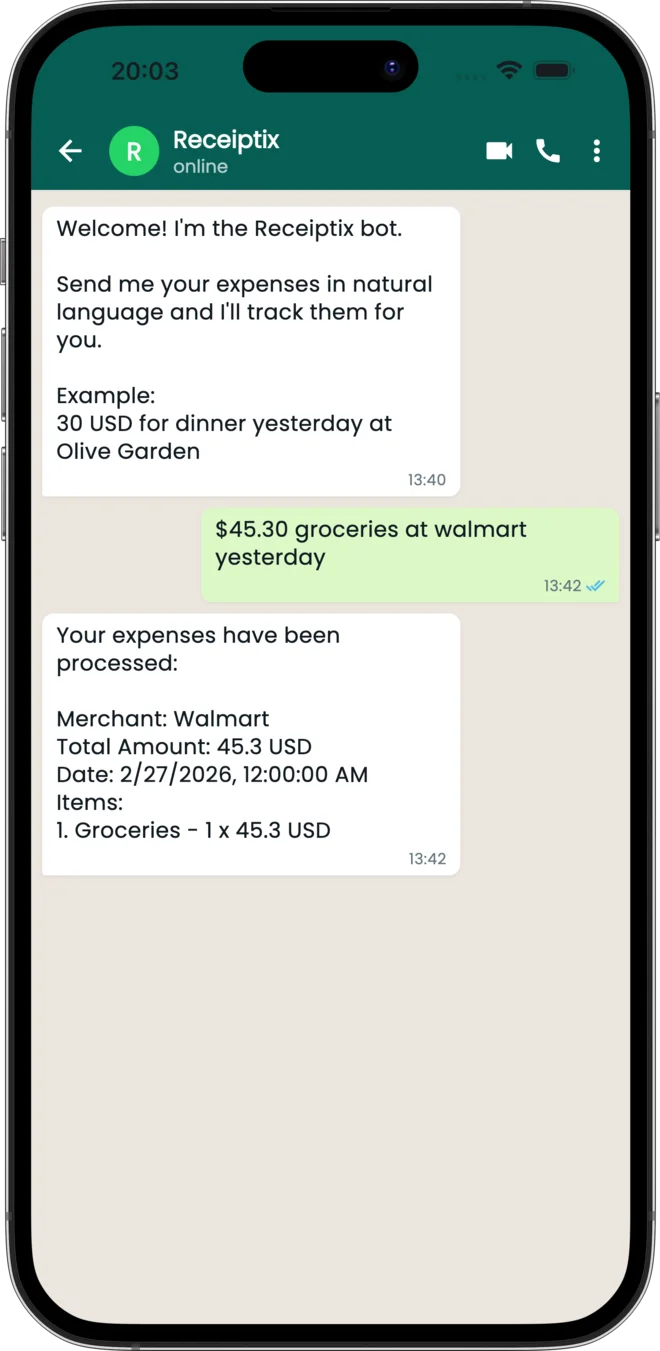
You don’t need the app to start
Here’s the part that’s genuinely different. You can use the WhatsApp bot before you’ve installed anything.
Message the number, log an expense, and Receiptix quietly creates an account behind the scenes tied to your WhatsApp number. Your first few receipts are already saved. Later, when you want the charts, the multi-device sync, or the web view, you send /signup and link a real account — and everything you logged comes with you. Nothing to re-enter, no data stranded in a trial.
This flips the usual order of things. Normally you install an app, sit through onboarding, create an account, and only then get to try the thing you came for. With WhatsApp you get value first — your coffee is logged — and decide whether to go deeper afterward. For anyone who’s wary of installing yet another finance app, it’s a low-stakes way to see if the habit sticks.
Tags and projects come along for the ride
The bot isn’t a stripped-down version of Receiptix. The organizing tools work right inside your messages.
Add a hashtag and it becomes a tag: “40 dinner #client-dinner” files that expense under a tag you can filter and report on later. Useful if you’re tracking spending by client, by trip, or by event without wanting to open the app and edit anything.
Projects work too. If you’ve set up shared Projects — a household budget, a group trip, a freelance client — you can route an expense straight into one. Type #project:Iceland in your message, or send /project and the bot shows you a tappable list of your projects to pick a default. Log a taxi from the airport and it goes to the trip everyone’s sharing, not your personal pile.
So the WhatsApp bot isn’t a side door into a lesser experience. It’s the same data, the same structure, reachable from the keyboard you already have open.
It joins the Telegram bot
If you’ve been using the Telegram bot, none of this will feel new — WhatsApp does the same job through a different messenger. The reason for adding it is reach. WhatsApp is the default way people message across Latin America, most of Europe, India, and much of Africa, and asking someone to install Telegram just to log a receipt was a real barrier. Now the bot meets people where they already are.
You can use both, by the way. Some people keep Telegram for personal stuff and WhatsApp for work, and Receiptix doesn’t care which thread an expense arrives in — it all flows into the same account.
How to connect it
If you already have Receiptix installed, open Settings, tap WhatsApp, and you’ll get a short code. Send that code to the bot and your WhatsApp number links to your account — from then on, every message you send lands in your existing data.
If you don’t have the app yet, you can start cold. Head to receiptix.io/whatsapp, which opens the chat for you (or shows a QR code if you’re on a desktop), send your first expense, and you’re tracking. Install the app whenever you want the full picture — your messages will already be waiting there.
Receiptix is on iOS and Android, and the WhatsApp bot works alongside both. The next time you buy a coffee, you don’t have to reach for an app. You just text it.
Note: This blog post is for informational purposes only and does not constitute financial advice. Always consult with a financial advisor for personalized guidance.